Just added a feature in Filezo! You can now pin frequently used files and folders on top of the search list.
Although Filezo! supports color coded tagging of files and folders, many customers requested for the ability to pin favorite files and folders for fastest access. We heard you!
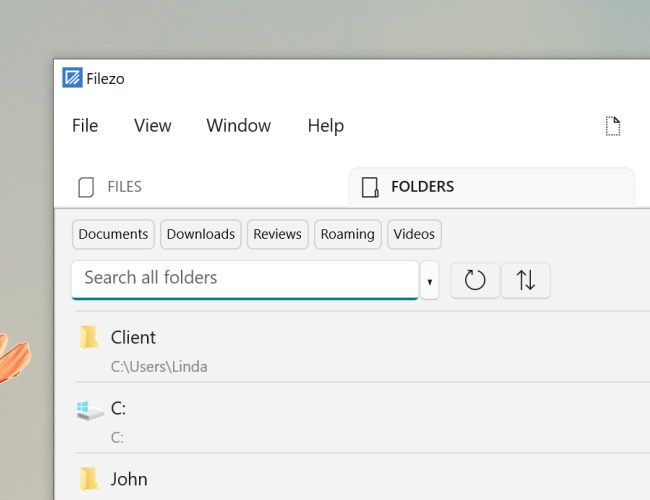
The top row listing ‘Documents’, ‘Downloads’, ‘Reviews’ etc are pinned folders. Similarly you can pin files that you access often.
What is Filezo?
Filezo is a superfast launcher for Windows designed to make your computing life joyful. It gives you instant access to any of your files, folders and apps without the need to browse through hierarchical folders. Type and go! That’s it.
Here is are some of the key Filezo features:
- Lightning speed access to any file, folder or app on your Windows PC.
- Tag files and folders. Supports color-coded and hierarchical tags.
- Pin frequently used files and folders on top of the list for quick one click access.
- Add a note to any file without modifying the file itself.
- Integrates with the Windows File open/save window. Directly select a file or jump to any folder in Windows File open/save window using Filezo.
- Preview various types of files including audio/video. Install previewer add-ons to support more files.
- Quick manage files (copy, rename, delete, move) directly from Filezo without the need to open your File manager like Windows File Explorer..
- Share tagged files and folders with other Filezo users over network.
- Share annotated files and folders with other Filezo users over network.
- Quickly find and drag/drop a file over other apps such as the Internet browser, email app, messaging app etc.
- Many more hidden nuggets designed to make file and folder access easier.
Learn more about how Filezo can surprisingly ease the way you access your files and folders :)
For more videos, check out our YouTube channel.
Have a good day!