
Notezilla Features & Screenshots

Text formatting & spell check
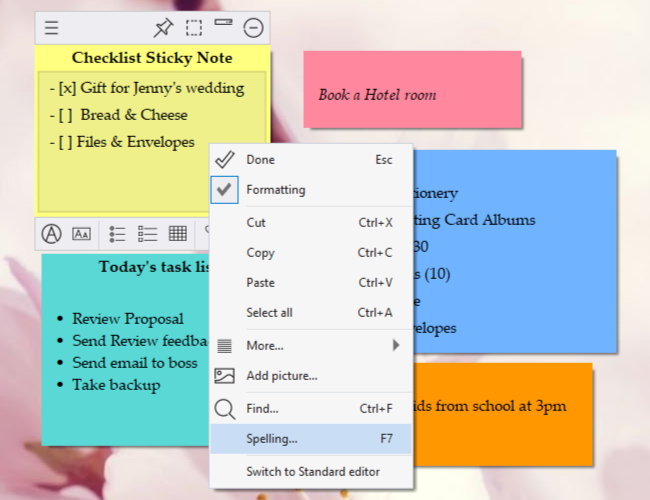
Sticky notes spelling check, insert pictures & text formatting

Sticky notes in Notezilla supports sophisticated text formatting features:

  • Format text (font style, size & color).
  • Bullets, numbering & checklist.
  • Outlining (multi-level bullets & numbering).
  • Count words, characters.
  • Insert the current date & time into a sticky note.
  • Paste as unformatted plain text.
  • Automatic spell-check.
  • Optional Markdown text formatting.

Watch a short video (1m 46s) - Formatting text in Standard editor.
Watch a short video (2m) - Formatting text in Markdown editor.

Notezilla runs on Microsoft Windows 11 & 10. Also available for Android, iPhone/iPad/Mac (iOS) & other devices
TRY NOTEZILLA
FOR FREE!

Windows | Portable
Android | iPhone

Sticky Notes for Windows 11/10/8/7

Notezilla

Better Sticky Notes App for Windows & Phones

Attach digital sticky notes to anything. Access them from anywhere. Sync sticky notes between devices, Send notes to anyone. Try it free!

Learn more
File/Folder Launcher & Clipboard History Manager for Windows 11/10

Filezo

Magic File Launcher & Clipboard Manager for Windows

Get fastest access to your files, folders & clipboard history inside any app on Windows. You will love it :) Try it free!

Learn more
File copy program for Windows 11/10/8/7

Copywhiz

Crazy & Smart File Copy Program for Windows

Have more control when copying and backing up files in Windows. Automate complex tasks & save hours. Try it free!

Learn more