Filezo Features & Screenshots
Quick access using the deskbar
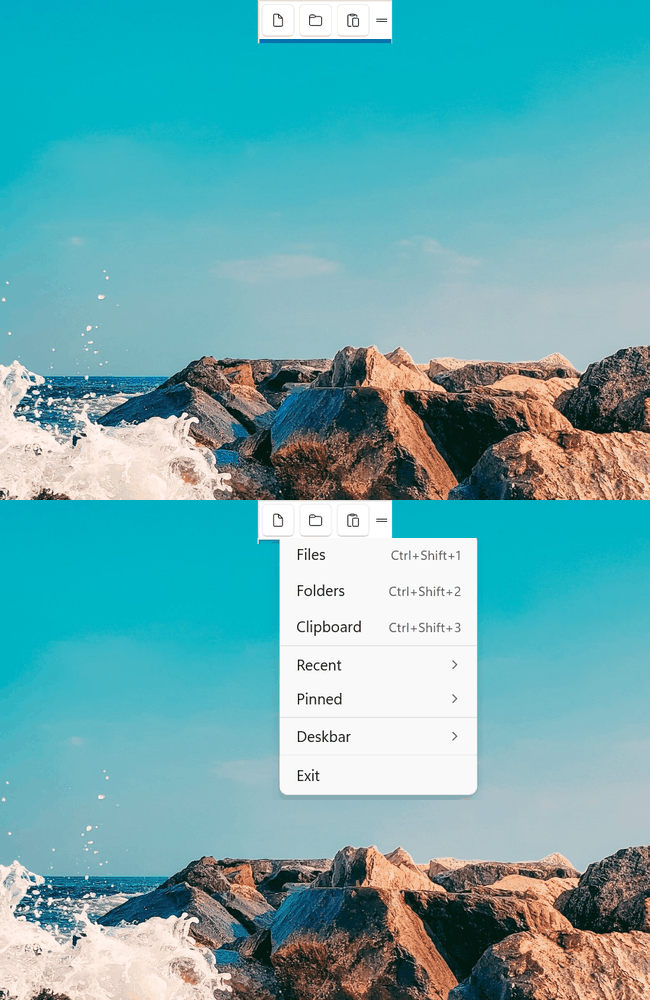
Filezo is accessed using a convenient deskbar on your Windows desktop.
With a single click, you get access to everything - Your Files, Folders, Apps and Clipboard History.
The right click context menu let's you quickly open any recent/pinned item without opening the main app window.
You can hide the deskbar and access Filezo using the hotkey or the icon in the notification area of the taskbar.
Drag the deskbar to any edge of your desktop or any display monitor. It auto-slides so that it doesn't overlap with other running applications.
Filezo runs on Microsoft Windows 11, Windows 10.