Filezo Features & Screenshots

Paste a clip directly into any app
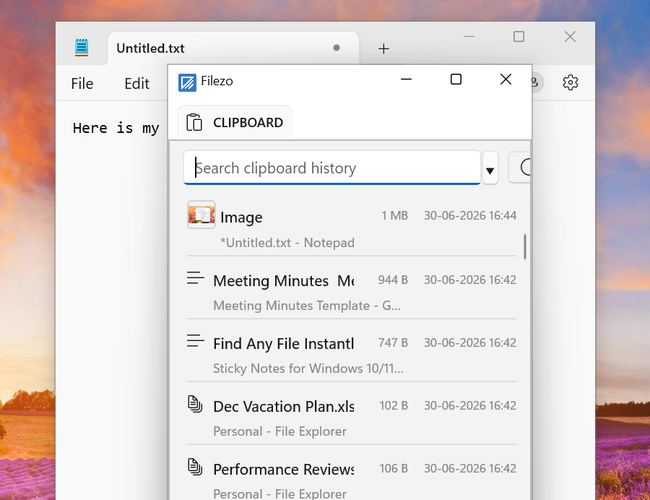
Clipboard History Manager/Extender for Windows 10/11

Filezo lets you directly paste a clipboard clip into the active app. Just press the hotkey (default: Ctrl+Alt+V) to open the Filezo clipboard history popup and select a clip, that's it.

While in the popup, you can also search through your clipboard history using keywords or tags.

This is a highly convenient and powerful way of accessing your clipboard history.

Filezo runs on Microsoft Windows 11, Windows 10.

TRY Filezo
FOR FREE!

Windows | Portable

Sticky Notes for Windows 11/10/8/7

Notezilla

Better Sticky Notes App for Windows & Phones

Attach digital sticky notes to anything. Access them from anywhere. Sync sticky notes between devices, Send notes to anyone. Try it free!

Learn more
Launcher for Windows 11/10

Filezo

Find Any File Instantly, Tag Files in Windows

Find any file or folder instantly, tag files & folders in Windows. Add a note to any file or folder. You will love it :) Try it free!

Learn more
File copy program for Windows 11/10/8/7

Copywhiz

Crazy & Smart File Copy Program for Windows

Have more control when copying and backing up files in Windows. Automate complex tasks & save hours. Try it free!

Learn more