Copywhiz Features & Screenshots

Copy only new or modified files
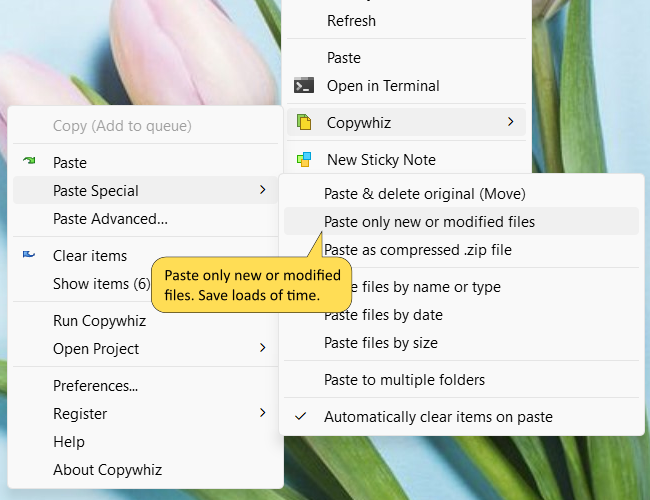
Copy only changed/modified files or new files

Using Copywhiz, you can copy only files that are newly added or recently edited. This feature can save a lot of time when copying a large number of files.

Many times we wish to share/upload only recently modified files, or backup only changed files to another drive or pick the latest music/pictures from multiple folders. Copywhiz lets you do all of these with a just few clicks right from Windows File Explorer.

Alternatively, you can copy files based on specific dates (date modified, date created, date accessed).

Copywhiz also works with Total Commander, xplorer2, Directory Opus, XYPlorer & ExplorerXP.

Watch a short video (2m 28s) demonstrating this feature.

Copywhiz runs on Microsoft Windows 11, Windows 10, Windows Server & Windows 8.

TRY COPYWHIZ
FOR FREE!

Windows | Portable

Sticky Notes for Windows 11/10/8/7

Notezilla

Better Sticky Notes App for Windows & Phones

Attach digital sticky notes to anything. Access them from anywhere. Sync sticky notes between devices, Send notes to anyone. Try it free!

Learn more
File/Folder Launcher & Clipboard History Manager for Windows 11/10

Filezo

Magic File Launcher & Clipboard Manager for Windows

Get fastest access to your files, folders & clipboard history inside any app on Windows. You will love it :) Try it free!

Learn more
File copy program for Windows 11/10/8/7

Copywhiz

Crazy & Smart File Copy Program for Windows

Have more control when copying and backing up files in Windows. Automate complex tasks & save hours. Try it free!

Learn more