Copywhiz Features & Screenshots

Auto-rename files with duplicate names
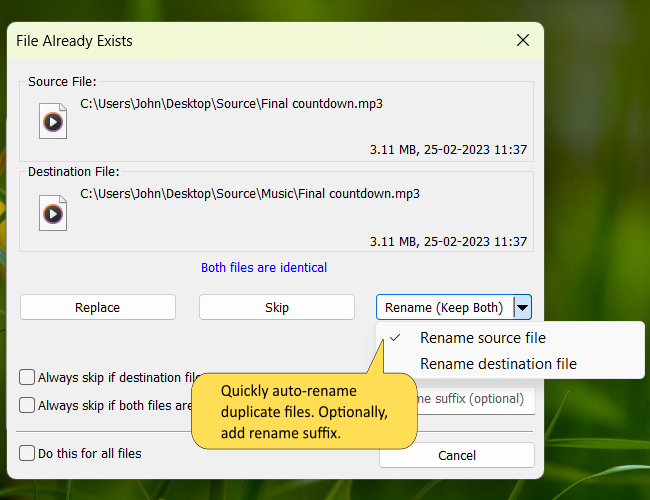
Automatically rename duplicate files when copying

When copying files, Copywhiz can rename duplicate files so that you can keep both versions of the file (the original file & the file being copied).

When the first duplicate file is detected, Copywhiz will ask you if you wish to replace it. You can opt to rename the destination file with a suffix instead of overwriting it . Or you may also rename the file that is being copied.

You don't have to choose this option for each duplicate file encountered. Copywhiz has the option to apply the same suffix to all duplicate files.

Watch a short video (1m 50s) demonstrating this feature.

Copywhiz runs on Microsoft Windows 11, Windows 10, Windows Server & Windows 8.

TRY COPYWHIZ
FOR FREE!

Windows | Portable

Sticky Notes for Windows 11/10/8/7

Notezilla

Better Sticky Notes App for Windows & Phones

Attach digital sticky notes to anything. Access them from anywhere. Sync sticky notes between devices, Send notes to anyone. Try it free!

Learn more
File/Folder Launcher & Clipboard History Manager for Windows 11/10

Filezo

Magic File Launcher & Clipboard Manager for Windows

Get fastest access to your files, folders & clipboard history inside any app on Windows. You will love it :) Try it free!

Learn more
File copy program for Windows 11/10/8/7

Copywhiz

Crazy & Smart File Copy Program for Windows

Have more control when copying and backing up files in Windows. Automate complex tasks & save hours. Try it free!

Learn more