Copywhiz Features & Screenshots

Retry or skip files on error
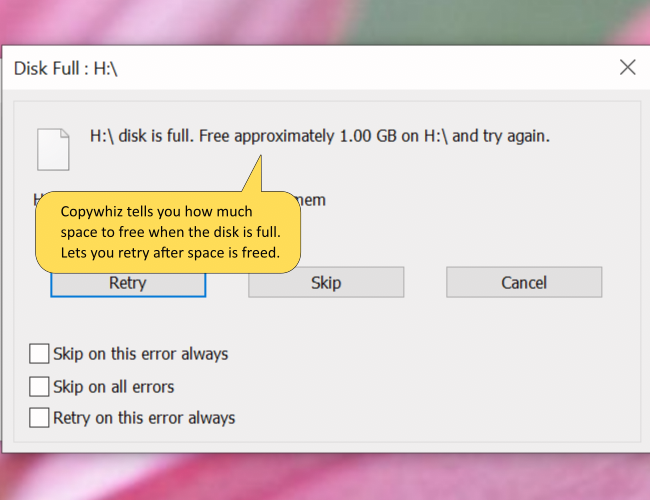
Retry or skip files on error when copying files

It can be annoying to see our file copy operation stop abruptly on an error.

Copywhiz handles this situation smoothly. When copying files, Copywhiz does not stop on error. Instead, it lets you retry or skip that particular file.

Eg. If a file is locked (file-in-use), Copywhiz will wait until you unlock the file. In fact, Copywhiz will even show you which program is using the file so that you can close the program to continue with file copy.

Also, if the disk is full, Copywhiz will show how much space you need to free in order to complete the operation successfully.

Copying files using Copywhiz is a very enjoyable & fruitful experience.

Copywhiz runs on Microsoft Windows 11, Windows 10, Windows Server & Windows 8.

TRY COPYWHIZ
FOR FREE!

Windows | Portable

Sticky Notes for Windows 11/10/8/7

Notezilla

Better Sticky Notes App for Windows & Phones

Attach digital sticky notes to anything. Access them from anywhere. Sync sticky notes between devices, Send notes to anyone. Try it free!

Learn more
File/Folder Launcher & Clipboard History Manager for Windows 11/10

Filezo

Magic File Launcher & Clipboard Manager for Windows

Get fastest access to your files, folders & clipboard history inside any app on Windows. You will love it :) Try it free!

Learn more
File copy program for Windows 11/10/8/7

Copywhiz

Crazy & Smart File Copy Program for Windows

Have more control when copying and backing up files in Windows. Automate complex tasks & save hours. Try it free!

Learn more