Copywhiz Features & Screenshots
Review files before copying them
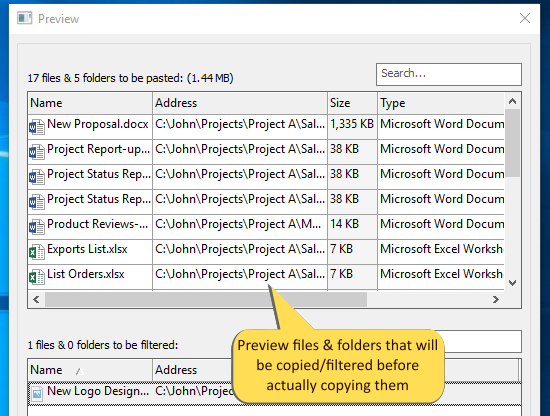
Copywhiz lets you review the list of files that will be copied before actually copying them.
When filtering files by type, date, or size, it is vital to verify whether the files you need will be copied successfully.
Reviewing files before copying them gives you confidence & keeps your mind relaxed.
You can alter different filter options (file type, date, or size) and ensure that the right files are copied. This feature, therefore, avoids mistakes, incorrect files to be copied & essential files to be left out.
Once you have set the filters, you can save the project so that you can re-run it anytime in the future without the need to re-configure.
Watch a short video (1m 52s) demonstrating this feature.Copywhiz runs on Microsoft Windows 11, Windows 10, Windows Server & Windows 8.