Filezo Features & Screenshots

Add a note to a file, folder or clip
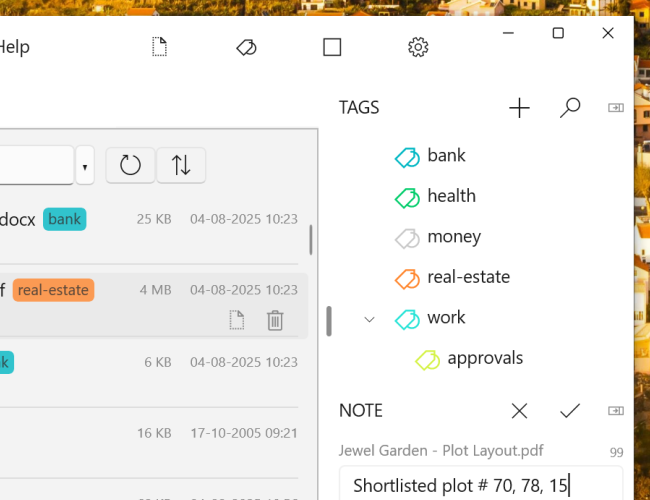
Annotate files and folders in Windows

Filezo lets you add a note/comment to any file, folder or clip in Windows. Without editing them directly, you can annotate them.

Annotated files and folders can be shared with other users over network. This can be very useful, really.

If you copy, move or rename a file/folder, the annotation is still retained. Annotations are restored automatically even after reinstalling Filezo.

Works seamlessly on NTFS file systems. On FAT32 etc, it requires additional steps to retain the annotations.

Watch a short video (2m 51s) demonstrating this feature.

Filezo runs on Microsoft Windows 11, Windows 10.

TRY Filezo
FOR FREE!

Windows | Portable

Sticky Notes for Windows 11/10/8/7

Notezilla

Better Sticky Notes App for Windows & Phones

Attach digital sticky notes to anything. Access them from anywhere. Sync sticky notes between devices, Send notes to anyone. Try it free!

Learn more
File/Folder Launcher & Clipboard History Manager for Windows 11/10

Filezo

Magic File Launcher & Clipboard Manager for Windows

Get fastest access to your files, folders & clipboard history inside any app on Windows. You will love it :) Try it free!

Learn more
File copy program for Windows 11/10/8/7

Copywhiz

Crazy & Smart File Copy Program for Windows

Have more control when copying and backing up files in Windows. Automate complex tasks & save hours. Try it free!

Learn more