Copywhiz - Flexible File Copy & Backup Tool for Windows.
Learn about Copywhiz.
Copywhiz - Flexible File Copy & Backup Tool for Windows.
Learn about Copywhiz.
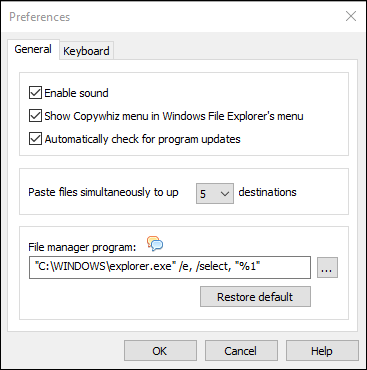
The Preferences window lets you configure general Copywhiz settings. To access Preferences right-click inside any folder in File Explorer (Windows Explorer) and choose Copywhiz → Preferences from the menu. Alternatively, you can also launch the Copywhiz program and click on the File → Preferences menu.
This window lets you change the sound setting, check for updates setting, and also default file manager setting.