 Copywhiz - Flexible File Copy & Backup Tool for Windows.
Learn about Copywhiz.
Copywhiz - Flexible File Copy & Backup Tool for Windows.
Learn about Copywhiz.
For the ones having large number of mp3 files, this is a really useful feature.Copywhiz allows you to paste these mp3 files in the destination folder, in an organized folder structure based on their metadata.
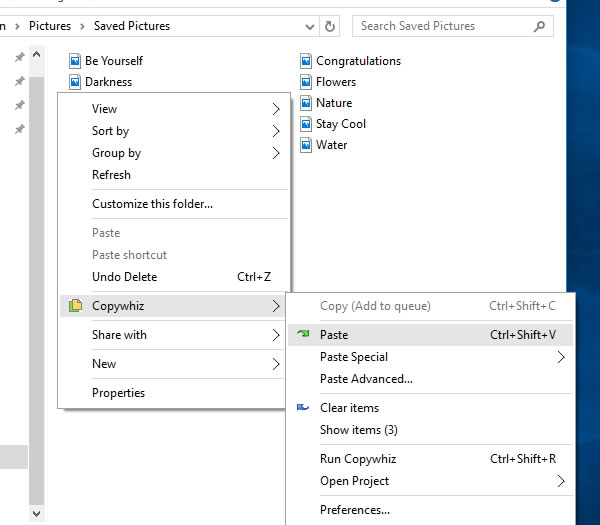
You can organize based on one more metadata like title, artist, album, year, genre etc.If you have selected files in Copywhiz using the File Explorer (Windows Explorer), then go to the destination folder. Right-click inside the folder, choose Copywhiz → Paste Advanced to open the Copywhiz window and click on the 'Advanced Settings' button as shown in the picture below.
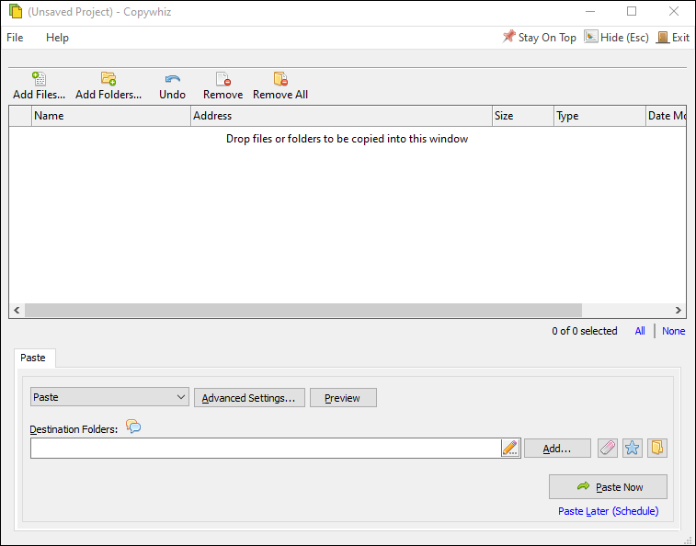
If you have Copywhiz's main window already open, then you can directly click on the 'Advanced Settings' button as shown in the picture below.
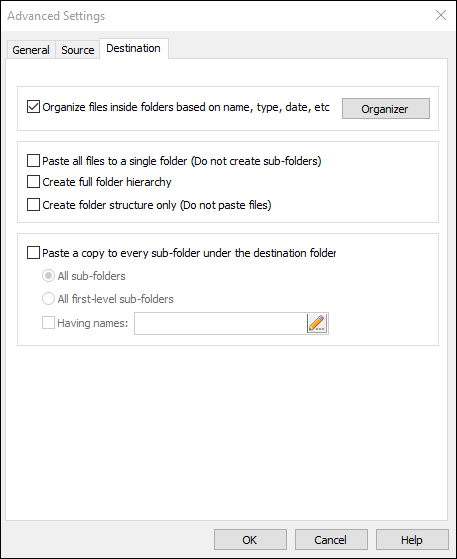
Now go to the 'Destination' Tab and select the Organizer option.
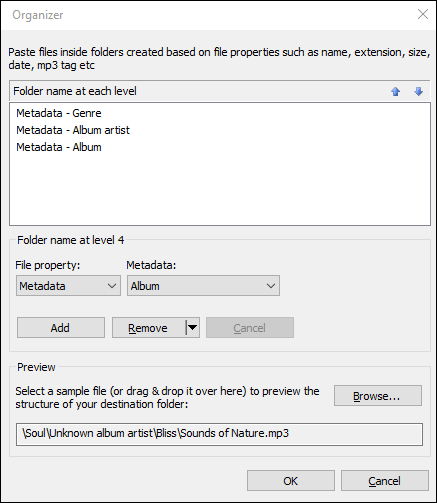
Choose the 'Metadata' criteria from the file property drop-down box and add the attributes.
You can also Preview how the folder structure will look, before pasting the files. It is also very easy to re-order, edit or clear the whole list.
Press the OK button and click on the 'Paste Now' button to finally copy the files in the structure specified. A sound plays indicating the successful completion of a file copy task.